Getting a raise is always welcome, especially when finances are tight and every little bit that comes in helps you pay your bills, put food on the table, and empowers you to provide for the basic needs of your family. But how much is that raise going to affect your income? There are two ways to find out:
- Wait until your paycheck comes
- Do the math (a.k.a. build a spreadsheet)
I love building spreadsheets and can’t stand the suspense of not knowing, so I would certainly choose the second option. Let the spreadsheet fun begin!
Getting Started
Calculating how your raise will affect your paycheck depends largely on how you get paid and how often. If you are a salaried employee or an hourly employee who gets paid the same amount each pay period,* you have it extremely easy. One simple step will help you calculate how much your raise will affect your pay to within 1% of how much your pay will change once your raise goes into effect.
* Most hourly employees who work a set amount of hours each week and get paid on a weekly or biweekly basis fall into this category.
If you are an hourly employee who gets paid semi-monthly or monthly, or you work a different amount of hours per week depending on what is available, then chances are your pay varies and you will have to take a slightly longer but still simple path to calculating your raise’s impact on your take home pay.
The Easy Way
For those who qualify for calculating the impact of their raise the the easy way all you need to get started is to find the the amount of your last regular paycheck and the percent increase that your raise represents. If your employer didn’t tell you your raise in terms of a percentage but instead told you that you got a raise of $0.50 or that you now make $13.50 and hour here is what you do calculate your percent increase:
- Determine the change from your old wage to your new wage
- Divide the change by your old wage
These steps are summed up by this equation with some example numbers found below:
 Once you have determined the percentage of increase all you do add 1 to it and then multiply that by what you used to take home after each pay period.
 The numbers in the image above are numbers from my normal paycheck, the percent raise I recently received, and my subsequent prediction of how much my new take home pay would be. As it turned out, my actual new take home pay was $937.43. My prediction was $1.50 or 0.16% over the mark – not too bad if you ask me! This method is so easy you might not even have to use a spreadsheet, but it might be a good idea anyway.
The Slightly Longer Easy Way
If you don’t get paid the same amount each paycheck then calculating how much a raise will increase your take home pay will take a little more time and require some more work on your part, but it is still fairly simple. To get rolling:
- Open up your favorite spreadsheet program (I use OpenOffice, an open source and free office application suite)
- Separate all that was stolen taken from your paycheck into two categories: pre-tax deductions and taxes & post-tax deductions- below is an example of how this can work, but you can do it any way you want
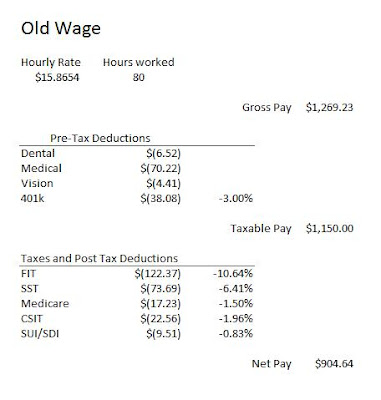
- Use an equation to calculate your old wage – Even though you know what your gross pay is from your old pay check, us the following equation to calculate your wage – Hourly Wage x Hours Worked – which should look like this inside the cell – “=B5*C5″. I recommend doing it this way because you will eventually have to insert this equation into your spreadsheet and you might as well do it now when you can check the product against your paycheck. If the number generated by your equation equals what is on your paycheck then you know you are doing right.
- Determine what your taxable pay and net pay are – you figure your taxable pay by subtracting all your pre-tax deductions from your gross pay. You figure your net pay by subtracting all your taxes and post tax deductions from your taxable pay. Entering your deductions and tax information as negative numbers allows you to use the sum function on Excel and OpenOffice, which can save you some time (and it looks something like this “=sum(D3:D6)” – with “D3″ being the first cell you want to add and “D6″ being the last).
- Find the percentage taken from your paycheck for your 401(k) contributions and taxes paid – You find the percentage sent to your 401(k) by dividing the amount that you contribute by your gross pay. In the post tax deduction section you divide each of the amounts deducted from your paycheck from the taxable pay section. We will assume that your tax rates will stay relatively stable despite your raise (even thought they will rise a little)
- Make a copy of your entire spreadsheet – paste all that you copied into a new tab. Next, copy and paste the percentage information by using the ‘paste special’ option. You can do this by right clicking on the cell where you want to paste it and choose the ‘paste special’ option. From there, pick the ‘values’ button and you should have all the values that you need for the next step.
- Determine your what your new gross pay will be – if your employer has already told you what your wage will be than simply put this into the wage cell. If they told you the percent increase that you will be receiving than use this equation to determine your new hourly rate:
- Insert the following equation into your taxes, post-tax deduction, and 401(k) cells – % * taxable income. This will end up looking something like “=D13*G7″. My finished product looked like this (the equations are color coded):


This should return the approximate amount that you get paid in with your raise. It won’t be exact (I was 0.42% off using this method) because your taxes will increase slightly with your pay increase, but it will still return a result within one percentage point of your future take home pay. That is still pretty good if you ask me.
Related posts:
Calculate a paycheck for a new pay schedule
If you have any questions about this process, feel free to contact me here.
Or you could just use Paycheckcity.com as I outlined here:
http://www.dontfeedthealligators.com/blog/how-payroll-changes-affect-your-take-home-pay